
Zulip dbt integration
Get notifications about dbt cloud job runs in Zulip!
-
Create a bot for dbt. Make sure that you select Incoming webhook as the Bot type.
-
Decide where to send dbt notifications, and generate the integration URL.
If you'd like your notification messages to link to your dbt job runs, make sure you include the dbt Access URL when generating the integration URL.
-
From your dbt Dashboard, navigate to Account settings. Select Notification Settings, go to the Webhooks section, and click Create webhook.
-
Set Webhook name to a name of your choice, such as
Zulip. Select the Events and Jobs you want to receive notifications for, and set Endpoint to the URL generated above. Click Save. -
Click Test Endpoint to send a test notification to your Zulip organization.
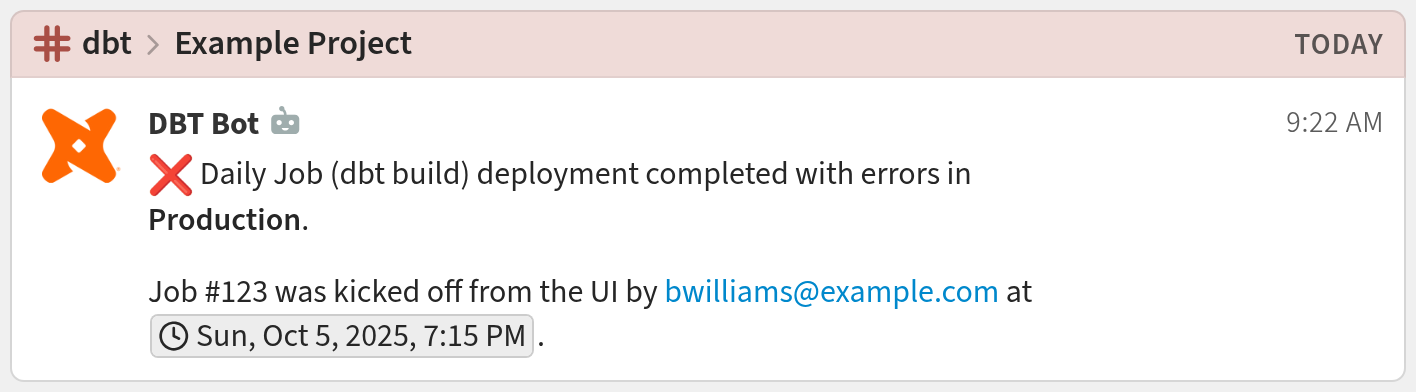
You're done! Your dbt notifications may look like this:
Filtering incoming events
The dbt integration supports filtering for the following events:
job.run.started, job.run.completed, job.run.errored
Related documentation
Logos are trademarks of their respective owners. None of the integrations on this page are created by, affiliated with, or supported by the companies represented by the logos.